FrameSentry emblem: a stylized purple ribbon F inside four corner viewfinder brackets.Beta Open · Coming Soon

Render Sequence Quality Control for Blender

Catch render problems before they reach delivery.

FrameSentry helps Blender artists and studios inspect rendered sequences, identify potential problems and review actionable findings before compositing or delivery.

FrameSentry Render Quality Control banner showing the FrameSentry mark and inspected render frames.
Architecture
Blender Adapter + Isolated Engine
Target Blender
4.5.15 LTS, 5.2.x, 5.3.x
Operation
Offline-first, strictly read-only
Release status
Beta open · v1.0 in qualification

01Why render-sequence QC matters

Catch silent frame defects before delivery.

Delivered animations often span hundreds or thousands of frames. Scrubbing by eye misses single-frame failures that are expensive when a client finds them first.

  • Silent render-node failures

    A crashed node or full disk leaves behind missing frames, zero-byte files, or truncated EXR and PNG containers that still look normal in a directory listing.

  • Mid-sequence visual accidents

    A GPU reset can drop a single black or blank frame, produce NaN or infinite pixel values, or trigger an abrupt brightness or exposure jump.

  • Read-only, non-destructive verification

    FrameSentry inspects your rendered sequence without modifying source files, storing engine paths in your .blend, or requiring an internet connection.

02Features & inspection workflows

Verified structural facts and heuristic visual checks.

Certainty: Verified

Structural & Container Validation

Deterministic checks performed by an isolated external decode worker, never inside Blender’s main process.

  • Missing frames compared against the active scene range or inferred sequence bounds, grouped into compact ranges
  • Zero-byte, unreadable, and truncated file detection via a bounded container census (OpenEXR, PNG, TIFF, JPEG)
  • Inconsistent frame dimensions, channel sets, per-channel pixel types, EXR part structure, or tiling
  • Naming anomalies (mixed padding, frame-number collisions, out-of-range files)
  • NaN and infinite pixel value counts in decoded float channels, plus exact duplicate frame detection
Certainty: Heuristic

Visual Analysis & Presets

Statistical per-frame checks over decoded pixel values with transparent measured values and thresholds.

  • Black or blank frame detection with single-range grouping for intentional fades
  • Brightness discontinuity checks using a robust median/MAD neighbourhood comparison
  • Highlight clipping and exposure jump detection relative to neighbouring frames
  • Configurable presets (Conservative, Default, Sensitive) that tune visual rules without altering structural checks
In-Blender UI

In-Blender Quality Control Workflow

Integrated into Blender’s Render Output properties and Image Editor sidebar for fast, non-blocking review.

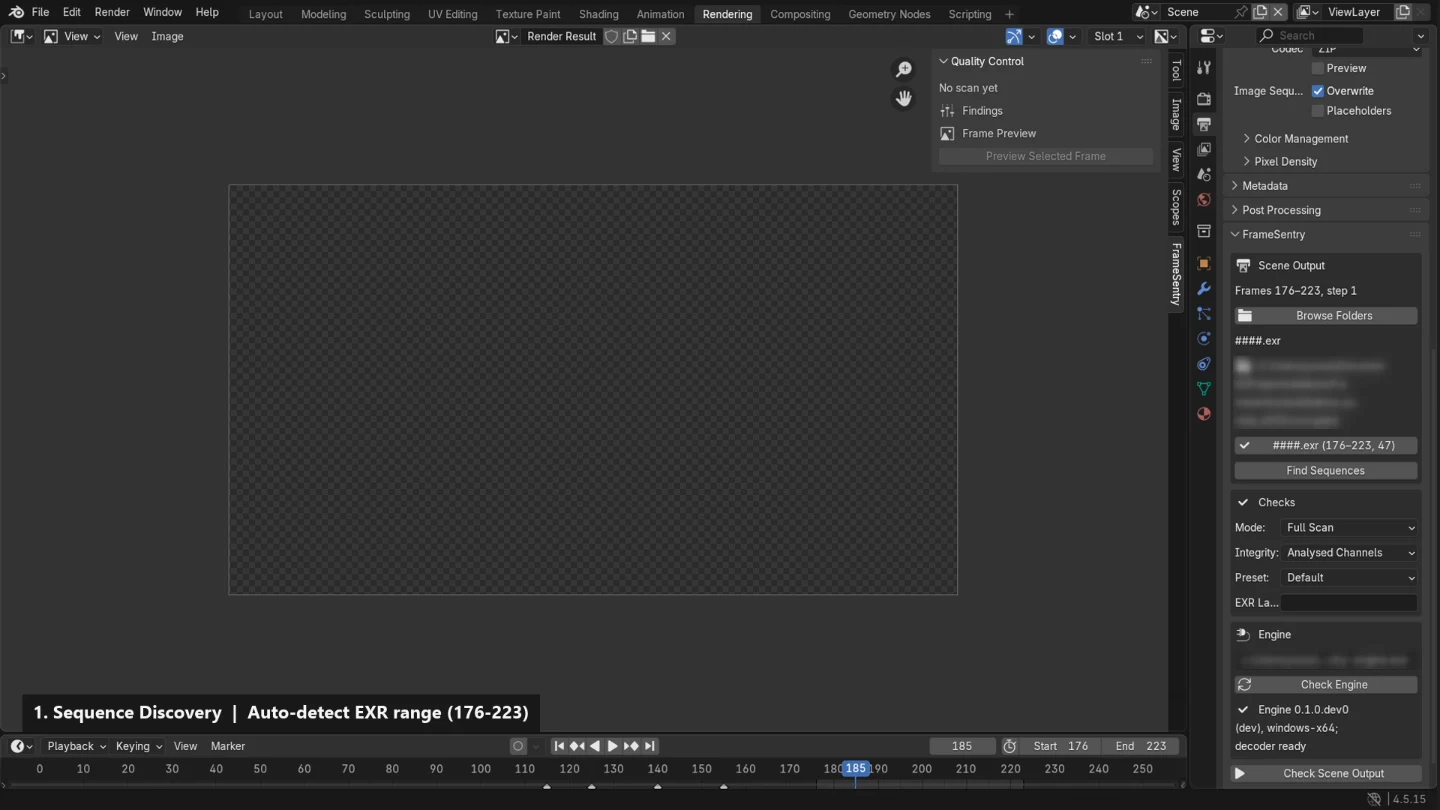
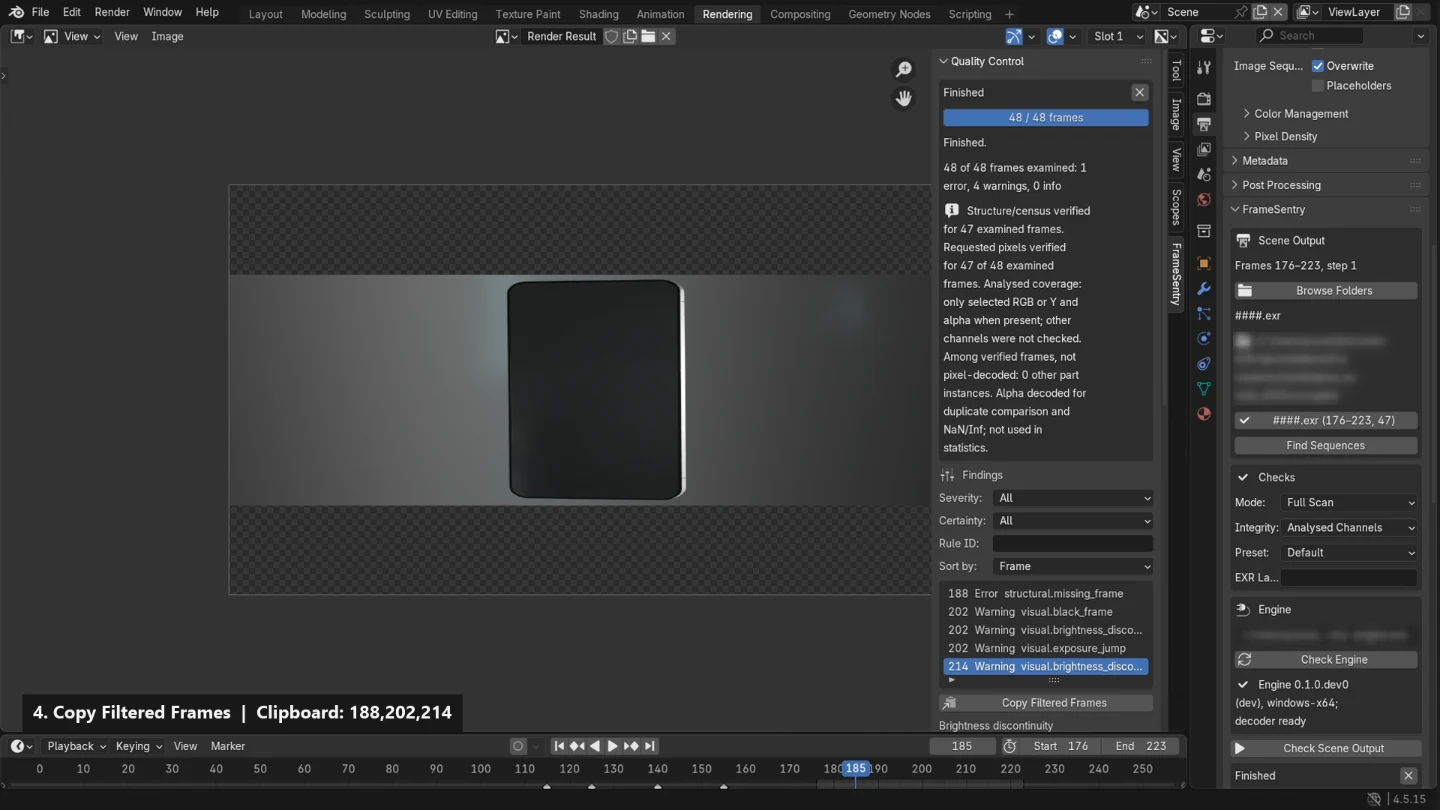
  • One-click “Check Scene Output” or directory discovery with single-click sequence selection
  • Asynchronous external engine execution with live progress and responsive cancellation
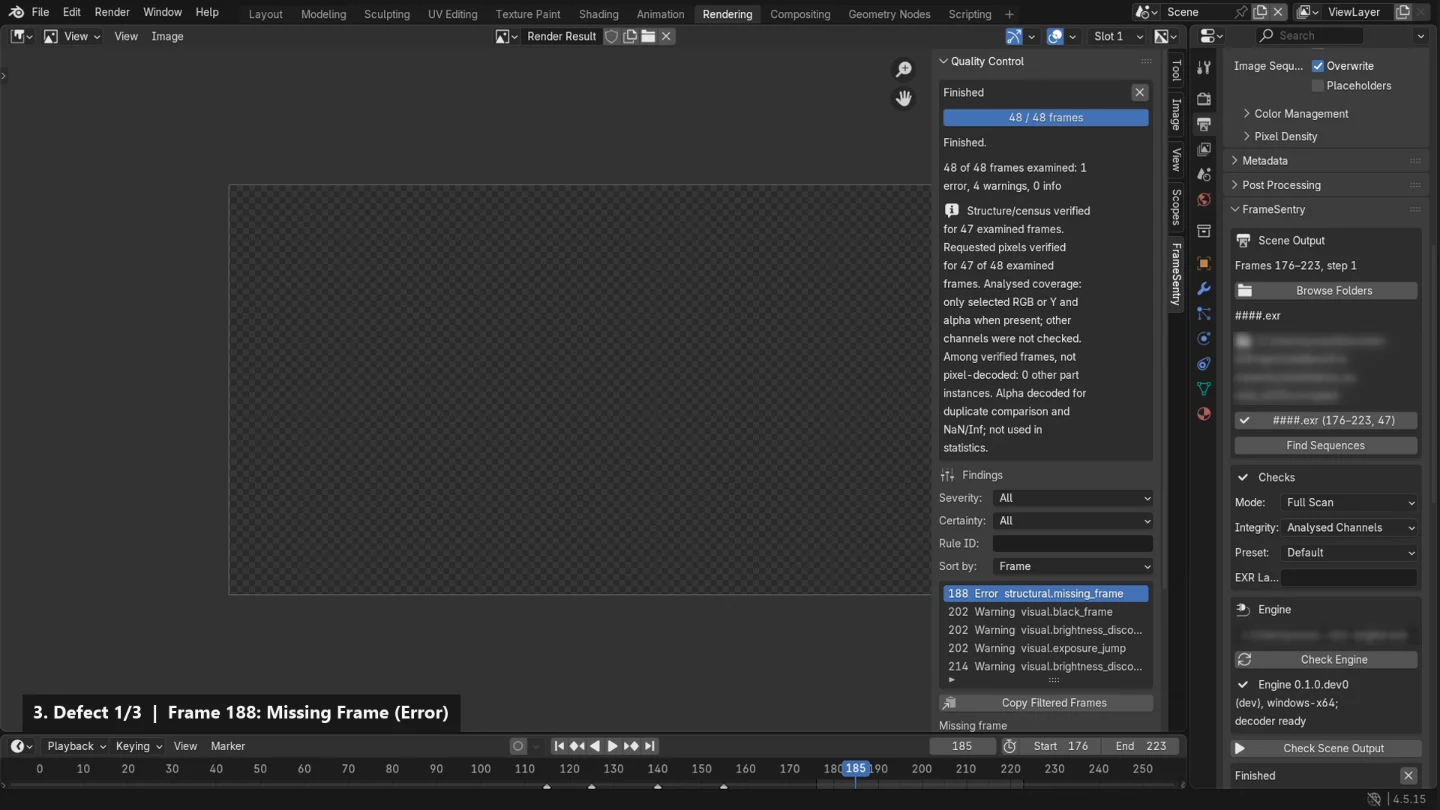
  • Paginated, filterable Findings Browser (Errors vs. Warnings) with plain-language explanations
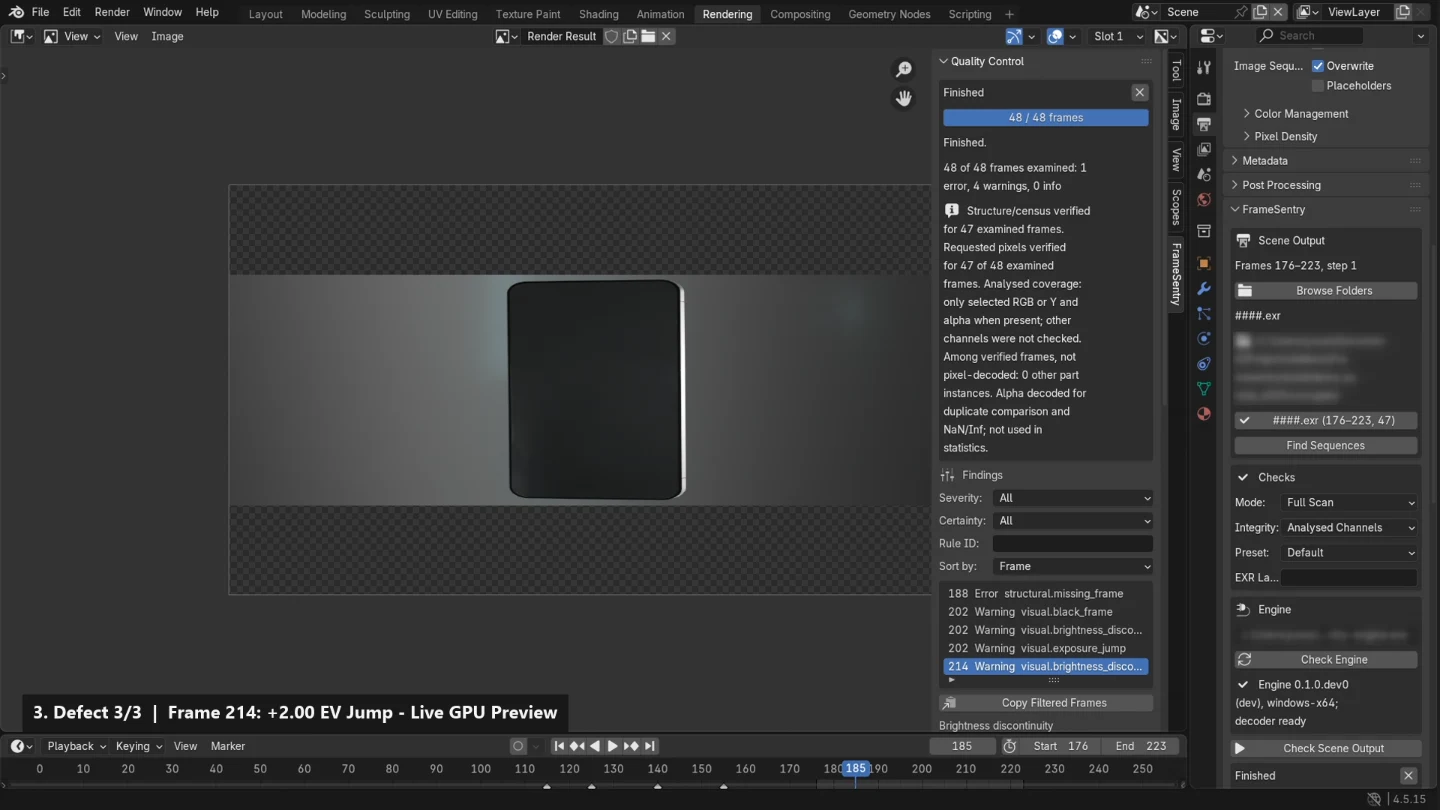
  • Contained GPU proxy preview texture inside Blender’s Image Editor without loading untrusted renders directly
  • Deduplicated “Copy Frames” and “Copy Filtered Frames” export (e.g. 4,7,10) for targeted re-rendering
Offline-First

Offline Architecture, Reports & CLI

Two-component design separating the Blender adapter extension from the standalone FrameSentry Engine.

  • Offline-first: zero network requests, no telemetry, no user accounts, and no online licence checks
  • Strictly read-only against source render directories; never overwrites existing files
  • Built for standalone HTML reports, structured JSON output, and command-line pipeline integration

04Real-world demonstration

End-to-end sequence inspection walkthrough.

Aurelia EXR sequence (frames 176–223) scanned in Blender 4.5.15 LTS on Windows OpenGL: sequence discovery, out-of-process OpenImageIO scan, defect inspection, and clipboard export.1080p · 46 s · Blender 4.5.15 LTS

05Blender compatibility & release status

Targeted versions and qualification gates.

Release status: FrameSentry is currently in beta. Version 1.0 release compatibility qualification is still in progress, and FrameSentry 1.0 is not yet released or fully qualified.

GPU Findings Preview gate: Full GPU Findings Preview must qualify across all three targeted Blender versions and graphics backends before those configurations are described as supported.

Targeted Blender versions and current qualification status
Blender VersionTarget TierQualification StatusScope & Notes
Blender 4.5.15 LTSTarget Tier 1Qualification in progressWindows OpenGL verified in beta testing; Vulkan and Linux/macOS targets remain in qualification.
Blender 5.2.xTarget Tier 1Qualification in progressTargeted LTS line. Windows OpenGL GPU preview qualification and compatibility checks are in progress.
Blender 5.3.xTarget Tier 2Qualification in progressTargeted release. Full GPU Findings Preview qualification is required across backends before support is claimed.

Target input formats

  • OpenEXR (single-part & multi-part/multilayer)
  • PNG (8/16-bit)
  • TIFF (8/16/32-bit)
  • JPEG (baseline & progressive)

Fields marked with an asterisk are required.

Tell us what formats you render (EXR, PNG, TIFF, JPEG), typical frame counts, and what issues you want to catch.

07Pre-orders & licensing

Pre-orders & direct licensing.

Coming Soon

Pre-orders opening soon.

Pre-orders are opening soon, with full version 1.0 direct licensing following final compatibility qualification. Pricing and checkout are not live yet.

Included in 1.0

  • FrameSentry for Blender (adapter extension)
  • FrameSentry Engine (standalone analysis application & CLI)
  • Offline-first operation with no telemetry or online activation servers

Pricing and direct checkout will be published here once pre-orders open.

08Frequently asked questions

Common questions

When will FrameSentry 1.0 be released?

A public release date is not set yet. FrameSentry is currently in beta while reporting, packaging, and full compatibility qualification are completed ahead of version 1.0.

Which Blender versions are targeted?

FrameSentry targets Blender 4.5.15 LTS, 5.2.x, and 5.3.x. Full GPU Findings Preview must qualify on all three targeted versions and graphics backends before they are described as supported.

Does FrameSentry modify my rendered frames or .blend files?

No. Sequence inspection is strictly read-only. FrameSentry never alters your rendered frames, never loads untrusted render files directly into Blender’s image loader during preview, and never stores local engine paths inside a .blend file.

Does FrameSentry require an internet connection or user account?

No. FrameSentry is designed offline-first with zero network access, zero telemetry, no user accounts, and no online licence servers.

What image formats are supported?

FrameSentry targets image sequences in OpenEXR (single-part and multi-part/multilayer), PNG, TIFF, and JPEG. Video containers such as MP4 or MOV are intentionally excluded from MVP.

How can I request early access or studio testing?

Use the Youssef Studio contact page to share your studio workflow, Blender version, and operating system. Early access and beta participation are coordinated directly by email.